Perfect Menu4.3.1
Publisher Description
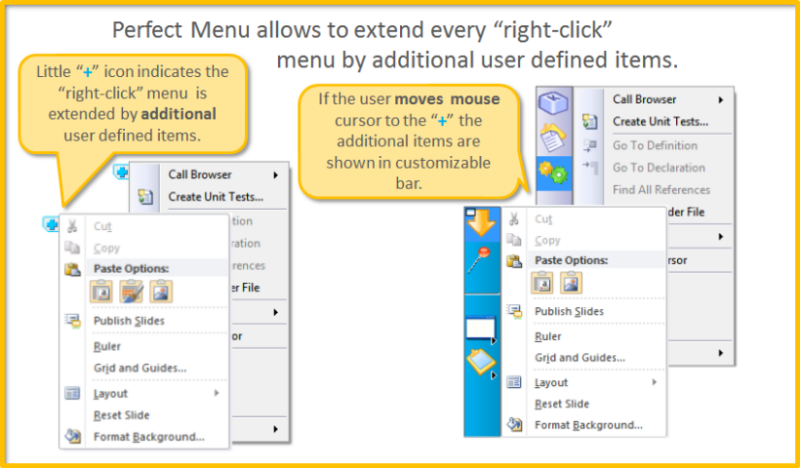
Perfect Menu is an innovative software that allows a user to customize or replace pop-up menu (menu that appears on right mouse button click) in any Windows application. It runs on background without occupying your desktop space (just its icon is shown in the Taskbar tray area) and waits for your right mouse button click. When you right-click, depending on how you configure Perfect Menu, it either extends standard context menu by adding new commands or completely replaces it by your own.
The Perfect Menu allows a user to have quick access to mostly used commands, files, applications and web sites, insert phrases or e-mail addresses, extend clipboard capability and more.
Key features:
- Ability to customize or replace pop-up (context) menus in any Windows application
- 20+ build-in commands including key sequence, paste text, multiple clipboards, send e-mail, etc.
- Can run macros from macro programs
- Quick access to mostly used commands, files, applications...
- Mini Taskbar
- Submenus
- Custom colors
- Lock mode to protect settings from unauthorized changes
About Perfect Menu
This Launchers & Task Managers program is available in English. It was last updated on 29 September, 2026. Perfect Menu is compatible with the following operating systems: Windows.
The company that develops Perfect Menu is Pitrinec Software. The latest version released by its developer is 4.3.1. This version was rated by 4 users of our site and has an average rating of 5.0.
The download we have available for Perfect Menu has a file size of 3.1 MB. Just click the green Download button above to start the downloading process. The program is listed on our website since 2013-12-26 and was downloaded 274 times. We have already checked if the download link is safe, however for your own protection we recommend that you scan the downloaded software with your antivirus. Your antivirus may detect the Perfect Menu as malware if the download link is broken.
How to install Perfect Menu on your Windows device:
- Click on the Download button on our website. This will start the download from the website of the developer.
- Once the Perfect Menu is downloaded click on it to start the setup process (assuming you are on a desktop computer).
- When the installation is finished you should be able to see and run the program.
Program Details
System requirements
Download information
Pricing
Version History
version 4.3.1
posted on 2013-12-26
Improved menu layer, many fixes.
version 4.0.1
posted on 2008-11-27
Support for MS Office 2007 menus, smaller fixes and changes.
